This post is not a step by step guide, it’s more a set of pointers in the right direction. I believe this is a project that is quite personal in how you set it up, so I don’t think it’s worth my time laying out everything.
There are a lot of smart alarm clocks out there now. It used to be that the smartest alarm clock you could get either:
- Woke you up with your favourite radio station.
- Woke you up with a hot cup of tea.
- Woke you up with an absolute bloody racket and usually small bits of plastic or metal flying across the room.
Now the market has matured a bit 1, more in some ways and less in others.
What I want in an alarm clock
I don’t want a lot. My dream alarm clock features are:
- Friendly to use as a normal alarm clock (i.e. gets my partner’s seal of approval).
- Ability to set the alarm times over the network via an easy REST API.
- No alarm functionality dependent on the network.
Nice to haves:
- Smart home control
- Music control
- Calendar display
The state of modern ‘smart’ alarm clocks
In this hypertechnologigal age, your alarm clock can have any of these six whole ‘smart’ features! It can:
- Play the radio when the alarm goes off.
- Wake you up with a light that brightens gently before your alarm, like a sunrise.
- Play music from your favourite Music As A Service provider (for a monthly fee).
- Set alarms and do other smarthomey things (by sending your voice over the internet to someone else’s servers and then executing the command…eventually)
- Harvest all your data, sell it to the highest bidder and also leak it over the open internet along the way.
- Literally just be an Android device in a funny shaped box with a slightly better speaker.
Now it might be me but none of these seem exactly smart. The sunrise light is cool but very few of them actually integrate with anything else in a smart way. The alarm clock radio has existed since 1971. And all of the other features serve to lock you in to an ecosystem that ultimately extracts value from your life than the value it adds.
Huh, what’s that at the end?
Turning an a*m*zon echo into an android device
Is surprisingly easy actually! If you’ve messed around with computers a little before and can follow instructions closely it should take you an hour or two.
Do not buy an echo new. Firstly the company that makes them are absolute bastards and you shouldn’t give them any of your money if you have any choice in the matter. Secondly they don’t make the models that the rooting tools work on anymore!
Luckily the echo models that this works on were released at the peak of smart-home-is-the-future-hype so there’s buckets of them sitting on the physical shelves of your local CEX (by buckets I mean about 1-2 per shop and loads online), and virtual buckets of them up on Ebay and Gumtree and (insert your local classified ads site here). I bought mine for about £40.
Full credit to Chris Person for first writing about this, and a massive thank you to the people on the XDA forums who spent months creating the software that makes this possible. Their software turns this device from something They own and You borrow, to something that is truly yours.
I’m not going to rehash anything in Chris’s article, and won’t repeat the instructions on the XDA forums here, but I’m going to talk about what I did with it once I had an echo that was Mine sitting on the bedside cabinet.
Turning android device into an alarm clock
From this point onwards nothing about what I’ve done is specific to the hardware of an echo. You can just as easily do this on any old android phone you have lying around. I just liked the form factor and the fact that there’s no battery to be unhappy about being constantly plugged in.
Home Assistant
Of course I installed HA. How I use Home Assistant more generally is outside the scope of the post, but for this I made two small dashboards for the screen, one for general use and one to control the bedroom’s speaker.2
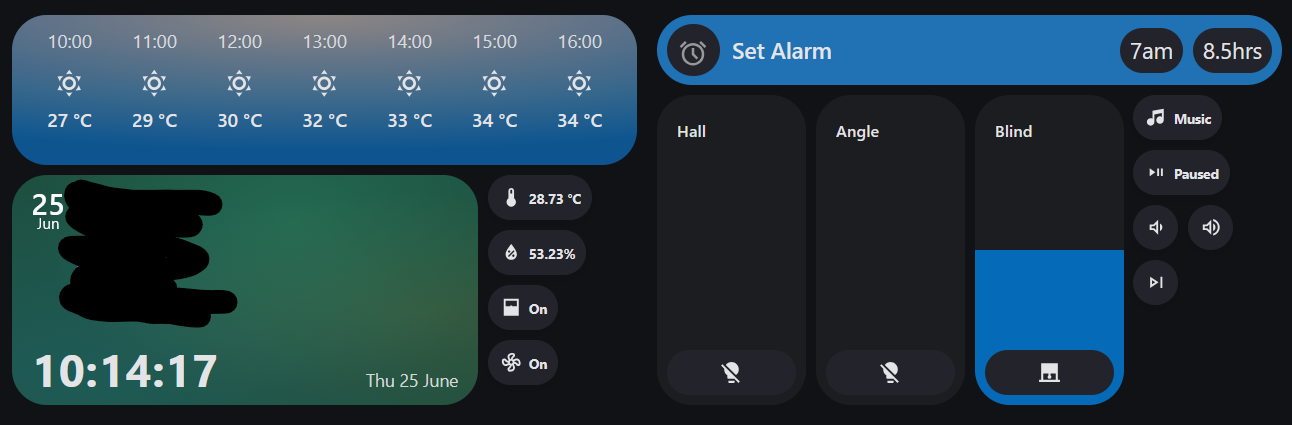

Dashboard cards used
- A lot of Bubble Card, including some plugins that are only on the creator’s patreon.
- All the small buttons are the Chips card from Mushroom.
- The music dashboard is two Massive Mediocre Media Player cards next to each other and chopped up by card-mod.
I use browser-mod to navigate the app between the two dashboards, put the app into Kiosk Mode to hide the HA app UI, and also display the occasional popup.
The Home Assistant app also very usefully provides a sensor that reports back the time of the device’s next alarm. This provides vital confirmation that local alarms are actually set rather than trusting that everything has worked fine.
AMdroid
I use AMdroid for the alarms just because I wanted slightly more configuration on how the actual alarms looked and sounded, but this was completely optional and the project would work just as well with the stock clock app.
Tasker
Tasker has been a godsend for me over the past decade of dealing with ADHD. I use it on my actual phone for various bits all the time, but here I want something simple.
It is a paid app, but fortunately you can get a lifetime direct purchase license for just $4.3 Tasker hosts the REST API that has three endpoints that:
- Sets, deletes and updates the alarms.
- Turns the turns the screen on or off depending on the room’s presence in HA.4
- Opens android’s default time picker to choose the alarm time.5
All of those are called from Home Assistant scripts and automations using the RESTful Command Integration. I just have a generic device that I can call however I want in the GUI. Its section in my config.yaml looks like this:
rest_command:
  tasker:
    url: 'http://:/'
    method: POST
    verify_ssl: false
    payload: ""
    timeout: 20
    ## Timeout is long to allow for Tasker tasks to fully complete.
    content_type:  'application/json; charset=utf-8'
I’ve also found the Clocktask Tasker Plugin to be far easier to use than Tasker’s default alarm tools.
How this all works in practice
Setting Alarms
Alarms are set by:
- Clicking the buttons on the alarm clock.
- The 7am and 8.5hrs are self-explanatory, but the icon button on the left has HA call Tasker to popup the Android time picker, receiving the chosen time as a response variable.
- Various Tasker scripts on my personal phone
- Automatic scripts (more to come in a future post)
All of these actions update a datetime helper (that just contains the time), and sets an input select to my default type of alarm (loud).
An HA automation notices the input select change. If the alarm type is ‘off’ it tells Tasker to delete all alarms. If the type is not ‘off’ and the time of the Next Alarm sensor being provided by the HA app doesn’t match the alarm time in the helper the automation calls a tasker endpoint to set the alarm, passing the alarm time.
Tasker on receiving this call:
- Deletes all currently set alarms
- Sets an alarm at the time provided by HA
- Sets 2 more alarms at 10 minute intervals afterwards.
As blunt force error handling Home Assistant keeps calling the Tasker API every 30 seconds until the time of the next alarm reported by the HA app lines up with the time in the datetime helper.
In the morning
In the morning before and after the first alarm goes off on the alarm clock there’s various smarthomey actions that aren’t really relevant here (Music, Lights, Blinds etc.).
As soon as the first alarm goes off HA starts looking for motion in the hallway outside the bedroom. When it does it deletes all the remaining alarms, assuming that at least one of us is out of bed and mildly functional.
Review
This works! Quite well! And is mildly redundant!
- As long as the alarms have been set HA/Tasker/the LAN could fall over in the night and the alarm will still go off.
- An important thing to mention is that when I’m displaying the alarm time on dashboards I always use the HA app reported next alarm time rather than the datetime helper. This means that if something has failed, it’s not showing me an alarm is set when it isn’t.
- HA won’t let me start any of my bedtime music/routines unless an alarm is set.
- It’s got the partner seal of approval! She’s now preferring to use it over her phone.
- This post is already long so I won’t go into detail but there’s also provision for one of us to set a quiet alarm for an early morning start and then a loud one be automatically set once the quiet one has gone off.
However there are things to work on:
- It’s a future project to fire tasker locally using URL’s on the dashboard to speed things up, meaning I could still set alarms if HA was unhappy but the app hasn’t refreshed.
-
Tasker normally takes at least a couple of prods via the REST API to actually wake up and start doing things and I’d love to fix that.
- Deletes all currently set alarms
- Sets an alarm at the time provided by HA
- Sets 2 more alarms at 10 minute intervals afterwards.
As blunt force error handling Home Assistant keeps calling the Tasker API every 30 seconds until the time of the next alarm reported by the HA app lines up with the time in the datetime helper.
In the morning
In the morning before and after the first alarm goes off on the alarm clock there’s various smarthomey actions that aren’t really relevant here (Music, Lights, Blinds etc.).
As soon as the first alarm goes off HA starts looking for motion in the hallway outside the bedroom. When it does it deletes all the remaining alarms, assuming that at least one of us is out of bed and mildly functional.
Review
This works! Quite well! And is mildly redundant!
- As long as the alarms have been set HA/Tasker/the LAN could fall over in the night and the alarm will still go off.
- An important thing to mention is that when I’m displaying the alarm time on dashboards I always use the HA app reported next alarm time rather than the datetime helper. This means that if something has failed, it’s not showing me an alarm is set when it isn’t.
- HA won’t let me start any of my bedtime music/routines unless an alarm is set.
- It’s got the partner seal of approval! She’s now preferring to use it over her phone.
- This post is already long so I won’t go into detail but there’s also provision for one of us to set a quiet alarm for an early morning start and then a loud one be automatically set once the quiet one has gone off.
However there are things to work on:
- It’s a future project to fire tasker locally using URL’s on the dashboard to speed things up, meaning I could still set alarms if HA was unhappy but the app hasn’t refreshed.
- Tasker normally takes at least a couple of prods via the REST API to actually wake up and start doing things and I’d love to fix that.
Thanks for reading all the way though this marathon! If you have any questions or want more information on specifics feel free to chuck them in the comments below, or ping me a message on Bluesky.
-
Or I’ve got older. Who could possibly tell. ↩
-
I don’t actually use the echo’s speaker at the moment, mostly because I’m happy with the Sonos speaker sat on the shelf above that is hooked up to my Lyrion Music Server ↩
-
I originally did this because I wanted to have no google on the clock at all, but I ended up having to login to google anyway for a later project. ↩
-
Tasker forces the screen on, but Tasker’s screen off action isn’t particularly reliable, so the actions adjust the screen timeout to either infinity or 15 seconds. ↩
-
I kind of hate this but there’s no good time picker dialog support that I could find for HA. ↩